
Sunday, February 15, 2026 · Updated Friday, October 2, 2026
How Do QR Codes Work? A Visual Guide to QR Code Technology
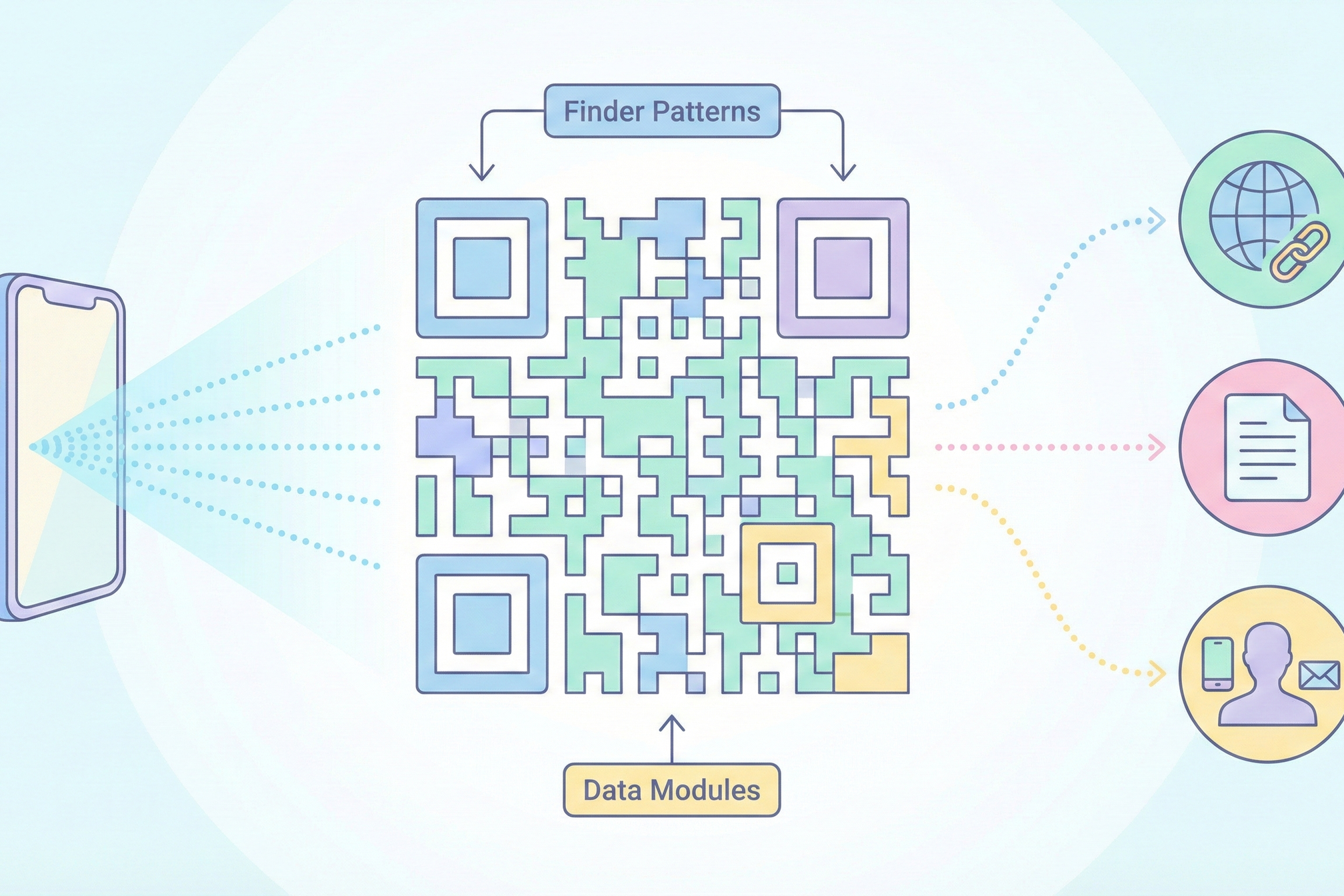
You point your phone camera at a small square of black and white dots, and a webpage instantly opens. It happens so fast that you might never stop to wonder: how does that actually work?
A QR (Quick Response) code is a two-dimensional barcode that stores data in a grid of black and white squares. When scanned with a smartphone camera, the pattern is decoded into text, a URL, contact information, or other data, instantly connecting the physical world to digital content.
QR codes were invented in 1994 by Masahiro Hara at Denso Wave, a subsidiary of Toyota, to track vehicle parts during manufacturing. The name "Quick Response" reflects their original purpose: being scanned faster than traditional barcodes. While they existed in relative obscurity for nearly two decades, the COVID-19 pandemic drove massive adoption for contactless menus, check-ins, and payments. They have remained ubiquitous ever since.
In this guide, we will break down exactly how QR codes work, from the anatomy of the code itself, to how data gets encoded into that black-and-white pattern, to what happens inside your phone when you scan one. We will also cover error correction (why damaged codes still work), dynamic QR codes, and safety tips.
The Anatomy of a QR Code: What Each Part Does
Every QR code, no matter what data it contains, shares the same basic structure. Understanding these components helps explain why QR codes are so reliable and versatile.
Finder Patterns (3 Large Squares) are the three large squares located in the top-left, top-right, and bottom-left corners. They tell the scanner where the QR code is and what orientation it has. This is why QR codes can be scanned at any angle: the finder patterns provide a fixed reference frame.
Alignment Patterns are smaller squares that help the scanner compensate for distortion, for example if the QR code is printed on a curved surface or photographed at an angle. Larger QR codes contain more alignment patterns.
Timing Patterns are alternating black and white modules running between the finder patterns. These help the scanner determine the size of individual data modules and maintain its grid reference across the code.
Format Information is a strip of data near the finder patterns that tells the scanner which error correction level is being used and which data mask pattern was applied.
Version Information is present in larger QR codes (version 7 and above) and tells the scanner how many modules the code contains. QR codes range from version 1 (21 by 21 modules) all the way to version 40 (177 by 177 modules).
Data and Error Correction Modules make up the remaining area and contain the actual encoded data spread across the grid in a specific pattern. This is where your URL, text, or other information lives.
Quiet Zone is the blank white border surrounding the QR code. This margin must be at least four modules wide to help the scanner distinguish the code from its surroundings.
How Does a QR Code Store Data? The Encoding Process
When a QR code generator turns your data into a black-and-white pattern, it follows a precise series of steps. Here is what happens behind the scenes.
Step 1: Data Analysis
The generator examines the input data (a URL, text, number, or other content) and selects the most efficient encoding mode. QR codes support four encoding modes: numeric (digits 0 through 9), alphanumeric (digits, uppercase letters, and some symbols), byte/binary (any character in ISO 8859-1), and kanji. Numeric mode is the most efficient, allowing a QR code to store up to 7,089 digits.
Step 2: Data Encoding
The data is converted into a binary bitstream using the selected encoding mode. For example, in alphanumeric mode, each pair of characters is converted to an 11-bit binary number. The bitstream includes a mode indicator (which encoding mode is in use), a character count, and the encoded data itself.
Step 3: Error Correction Coding
The generator adds redundant data using Reed-Solomon error correction. This is what makes QR codes so resilient: even if part of the code is damaged or obscured, the redundant data allows full recovery of the original content. QR codes offer four error correction levels: L (7% recovery), M (15%), Q (25%), and H (30%).
Step 4: Data Arrangement
The encoded data and error correction codewords are arranged into the QR code's module grid following a specific placement pattern. Data modules are placed in a serpentine path starting from the bottom-right corner, moving upward in two-column-wide strips.
Step 5: Masking
A mask pattern is applied to the data area to ensure the QR code does not contain large areas of uniform color, which would confuse scanners. The generator tests eight different mask patterns and selects the one that produces the most balanced distribution of black and white modules.
Step 6: Final Assembly
The finder patterns, timing patterns, format information, and version information are added to the grid. The result is a complete QR code ready to scan.
Data Capacity Reference
Data Type: Numeric only (0-9)
Maximum Capacity: 7,089 characters
Data Type: Alphanumeric (A-Z, 0-9)
Maximum Capacity: 4,296 characters
Data Type: Binary/byte
Maximum Capacity: 2,953 bytes
Data Type: Kanji
Maximum Capacity: 1,817 characters
These are the maximum values for a version 40 QR code with the lowest error correction level. In practice, most QR codes use smaller versions with higher error correction, so actual capacity is lower. A typical URL QR code uses well under 1% of the theoretical maximum.
What Happens When You Scan a QR Code?
You point your phone at a QR code, and a website opens. Here is what happens in the fraction of a second between scan and result.
Image Capture. Your phone's camera captures the QR code image. Modern smartphones do not need a special app: the native camera includes QR code detection built in. The camera identifies the three finder patterns to locate the QR code within the frame.
Orientation Detection. Using the three finder patterns, the decoder determines the code's orientation and perspective. This is why QR codes work when scanned upside down, at an angle, or partially rotated. The three asymmetric finder patterns (they occupy three corners but not the fourth) provide an unambiguous reference frame.
Grid Extraction. The decoder reads the timing patterns and alignment patterns to establish the module grid, mapping every black and white square to its exact position. It compensates for perspective distortion (if you are scanning at an angle) and optical imperfections.
Data Decoding. The decoder reads the format information (error correction level and mask pattern), removes the mask, extracts the data modules in the correct serpentine order, and converts the binary bitstream back into the original data: a URL, text, phone number, or other content.
Error Correction. If any modules were unreadable due to damage, dirt, poor lighting, or partial obstruction, the Reed-Solomon error correction kicks in. The redundant data is used to reconstruct the missing information. At the highest error correction level (H), up to 30% of the QR code can be damaged and it will still scan correctly.
Action. The decoded data triggers an action on your phone: opening a URL in the browser, adding a contact to your address book, connecting to a Wi-Fi network, or displaying text. This entire process, from camera capture to opening a webpage, takes less than a second.
Why Do Damaged QR Codes Still Work? Error Correction Explained
You have probably seen QR codes with logos in the center, or QR codes that are scratched, partially covered, or faded, and they still scan fine. Here is why.
QR codes intentionally include redundant data, extra copies of the information encoded in a mathematically clever way using Reed-Solomon error correction. If some of the data is missing or unreadable, the error correction algorithm can reconstruct the original data from the redundant portions. It is similar to how you can understand a sentence even if some letters are missing: "H_w d_ QR c_des w_rk?" Your brain fills in the gaps. QR codes do this mathematically.
There are four error correction levels, each offering different tradeoffs between resilience and data capacity:
Level: L (Low)
Recovery Capacity: Up to 7% damage
Best For: Clean digital displays, maximum data capacity
Level: M (Medium)
Recovery Capacity: Up to 15% damage
Best For: General use, balanced capacity and resilience
Level: Q (Quartile)
Recovery Capacity: Up to 25% damage
Best For: Printed materials, outdoor signage
Level: H (High)
Recovery Capacity: Up to 30% damage
Best For: Logos in center, harsh environments, small print
This is also why logos in QR codes work. When a logo is placed in the center of a QR code, it effectively "damages" that portion of the code. If the QR code uses Level H error correction, up to 30% of the code can be covered by a logo and still scan correctly, because the error correction algorithm treats the logo as damaged data and reconstructs the original information from the remaining 70%.
How Do Dynamic QR Codes Work?
Everything described so far explains how static QR codes work, where the data is encoded directly into the pattern. But there is a second type that works differently: dynamic QR codes.
Static QR codes encode the final destination directly into the pattern. The data cannot be changed after creation, there is no scan tracking or analytics, they work forever with no server dependency, and they are free to create with any generator.
Dynamic QR codes take a different approach. Instead of encoding the final destination, the QR pattern encodes a short redirect URL (something like https://qrkit.io/abc123). When scanned, that short URL redirects to the actual destination, which can be changed at any time without reprinting the code. Every scan is logged with data including time, location, and device type.
In simple terms, a dynamic QR code is a QR-encoded URL shortener. The QR code always points to the same short URL. But the server behind that short URL can redirect to any destination you choose. Change the destination on the server, and every printed QR code automatically points to the new location.
Feature: Data encoded
Static QR Code: Final destination (URL, text, etc.)
Dynamic QR Code: Short redirect URL
Feature: Can change destination?
Static QR Code: No, must reprint
Dynamic QR Code: Yes, change anytime
Feature: Scan tracking
Static QR Code: None
Dynamic QR Code: Full analytics (scans, location, device)
Feature: Server dependency
Static QR Code: None, works offline
Dynamic QR Code: Requires active redirect service
Feature: Best for
Static QR Code: Permanent content, simple sharing
Dynamic QR Code: Campaigns, print materials, trackable links
Feature: Cost
Static QR Code: Free
Dynamic QR Code: Free tier available, paid for advanced features
For a deeper comparison, see our full guide on static vs dynamic QR codes.
What Are QR Codes Used For?
QR codes have found their way into nearly every industry. Here are the most common applications:
Website URLs are the most common use case. Scan a QR code on a poster, product, or business card to instantly visit a website. You can create a URL QR code in seconds.
Restaurant Menus became widespread during COVID when QR codes on tables replaced physical menus, and they have stayed. A menu QR code lets restaurants update offerings without reprinting.
Wi-Fi Sharing lets guests connect to a network without typing the password. A Wi-Fi QR code handles the connection automatically.
Contact Information (vCards) allows someone to scan a QR code on a business card and save contact details directly to their phone. Try creating a vCard QR code for your next networking event.
Payments through systems like Venmo, PayPal, Cash App, and WeChat Pay use QR codes to initiate transactions quickly and securely.
Event Tickets from airlines, concert venues, and event organizers use QR codes as scannable digital tickets, reducing paper waste and speeding up entry.
Product Packaging often includes QR codes linking to instructions, warranty info, nutritional details, or promotional content.
Marketing Campaigns use QR codes on print ads, flyers, and billboards to drive traffic to landing pages. With QR code tracking, businesses can measure exactly how many people engaged with each placement.
Are QR Codes Safe? Security Tips You Should Know
QR codes themselves are neutral: they are simply a way to encode data. But like any link, the destination behind a QR code can be malicious.
QR Code Phishing (Quishing) is a growing concern. Attackers place fake QR codes over legitimate ones (on parking meters, restaurant tables, or public signs, for example) that redirect to phishing sites designed to steal login credentials or payment information. This type of attack has increased significantly since 2023.
How to stay safe when scanning:
- Check the URL preview before opening it. Your phone shows the decoded URL before navigating to it.
- Be cautious of QR codes in public places that look like they were placed over an existing code (stickers layered on top of stickers).
- Do not scan QR codes from untrusted email or messaging sources.
- Use a QR code scanner that shows a URL preview before opening. Most default phone cameras already do this.
How businesses can build trust with their QR codes:
- Use branded or custom QR codes so customers recognize them as legitimate.
- Always include context near the QR code explaining what it does (for example, "Scan for our menu" or "Scan to visit our website").
- Use dynamic QR codes with a recognizable short URL domain so the preview looks trustworthy.
Frequently Asked Questions About How QR Codes Work
How does a QR code work step by step?
Data is encoded into a binary format and arranged into a grid pattern along with finder patterns and error correction data. When you scan the code, your phone's camera detects the pattern, decodes the binary back into the original data (a URL, text, or other content), and takes the appropriate action like opening a webpage.
How do QR codes work if they all look the same?
QR codes do not all look the same. The pattern of black and white modules is unique to each code's data. The three finder squares in the corners are always identical (they are for orientation), but the data area is different for every QR code. Codes with similar data will look similar but are never identical.
How much data can a QR code hold?
A single QR code can store up to 7,089 numeric characters, 4,296 alphanumeric characters, or 2,953 bytes of binary data. The exact capacity depends on the QR code version (its size) and error correction level. Higher error correction means less data capacity, since more space is used for redundancy.
Do QR codes need internet to work?
Scanning a QR code does not require internet. Your phone decodes the pattern offline using its camera and built-in software. However, if the QR code contains a URL, you will need internet to open the linked webpage. QR codes containing plain text, Wi-Fi credentials, or contact information work fully offline.
How do dynamic QR codes work?
A dynamic QR code encodes a short redirect URL instead of the final destination. When scanned, the short URL redirects to whichever destination the creator has set. The creator can change the destination anytime without reprinting the QR code, and every scan is tracked with analytics data including location, device, and time.
What is the downside of QR codes?
The main downsides are: they require a camera-equipped device to scan, they can be exploited for phishing if a malicious code is placed over a legitimate one, static codes cannot be updated after printing, and they need sufficient size and contrast to scan reliably. Dynamic QR codes also depend on an active redirect service.
Can QR codes be hacked or contain viruses?
QR codes themselves cannot contain viruses. They only store data like URLs or text. However, a QR code can link to a malicious website that attempts phishing or malware downloads. Always check the URL your phone displays before opening it, and be cautious of QR codes in public places that look like they have been tampered with.
How long does a QR code last?
Static QR codes last forever since the data is encoded directly in the pattern with no server dependency. Dynamic QR codes last as long as the redirect service remains active. The physical QR code itself (printed on paper, a sticker, or other material) lasts as long as it remains scannable, which depends on print quality and environmental conditions. For more detail, see our guide on whether QR codes expire.
Why do QR codes have three squares in the corners?
The three large squares (finder patterns) help your phone's camera locate the QR code and determine its orientation. Their asymmetric arrangement, occupying three corners but not the fourth, lets the scanner know which direction is "up." This is why QR codes work when scanned from any angle or even upside down.
What is the difference between a QR code and a barcode?
Traditional barcodes are one-dimensional: they store data in a single row of lines with varying thickness. QR codes are two-dimensional: they store data in a grid of squares across both horizontal and vertical axes. This means QR codes can hold significantly more data (up to 7,089 characters compared to roughly 25 for a standard barcode) and can be scanned from any angle rather than requiring precise horizontal alignment.